How to use SportsPay
Collect cricket match fees over WhatsApp. You type a few slash-commands in your team’s group; SportsPay splits the ground fee equally, gives each player a secure pay link, and tracks who has paid.
The chat images below are illustrative mockups rendered from the bot’s actual replies.
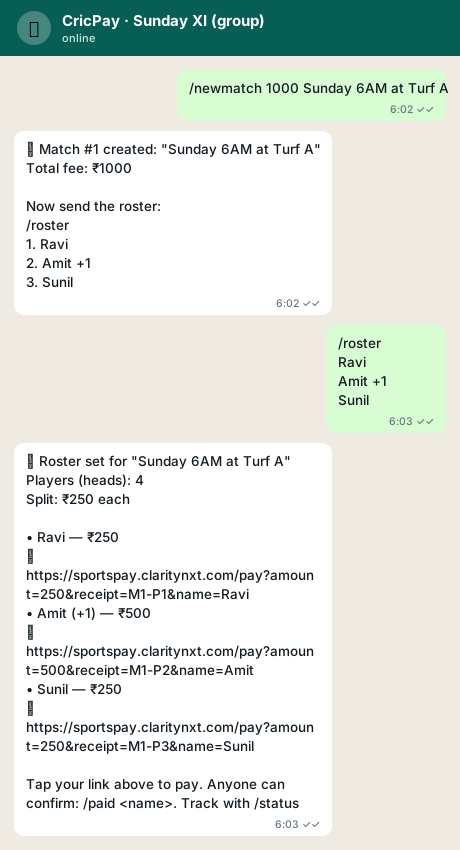
1. Start a match & set the roster
Create a match with the total ground fee, then send the team (one name per
line; add +1, +2 for guests). The fee is split equally
— the organizer is never counted — and each player gets their own pay link.
2. Confirm payments & see status
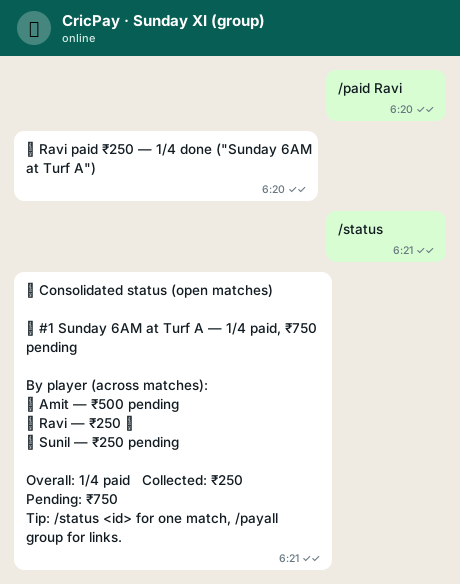
Anyone can confirm a payment with /paid <name>.
/status shows a consolidated board across all open matches.
3. One combined link across matches
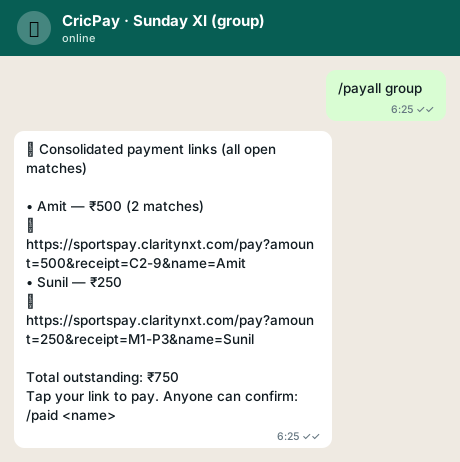
/payall group posts one combined link per player covering
everything they owe across all open matches.
4. The payment page
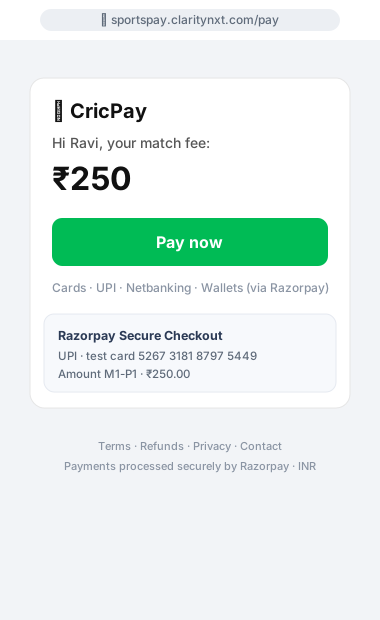
Tapping a link opens the secure checkout page with the player’s name and exact amount, then Razorpay handles Cards, UPI, Netbanking and Wallets. On success the player is auto-marked paid.
Command reference
/newmatch <fee> <title> | Start collecting for a match |
/roster [id] <names…> | Set the team & share pay links |
/add [id] <names…> | Add player(s) & re-split |
/remove [id] <name> | Remove a player & re-split |
/matches | List matches in this group |
/status [id] [group] | Consolidated board, or one match via id |
/paid [id] <name> | Mark someone paid |
/link [id] <name> | Show a player’s pay link |
/payall <name> | group | Combined link(s) across open matches |
/split [id] <name> <amount> | Change one person’s share |
/close [id] | Finish a match |
/help | Show the in-chat guide |
- The organizer is not counted — only listed names pay.
- Guests:
+1,+2after a name; they pay that many shares. - Match id is optional — skip it when one match is active.
- Amounts are shown exactly (e.g. ₹2.50).
- Works in a group or a 1:1 chat with the bot number.